TL;DR
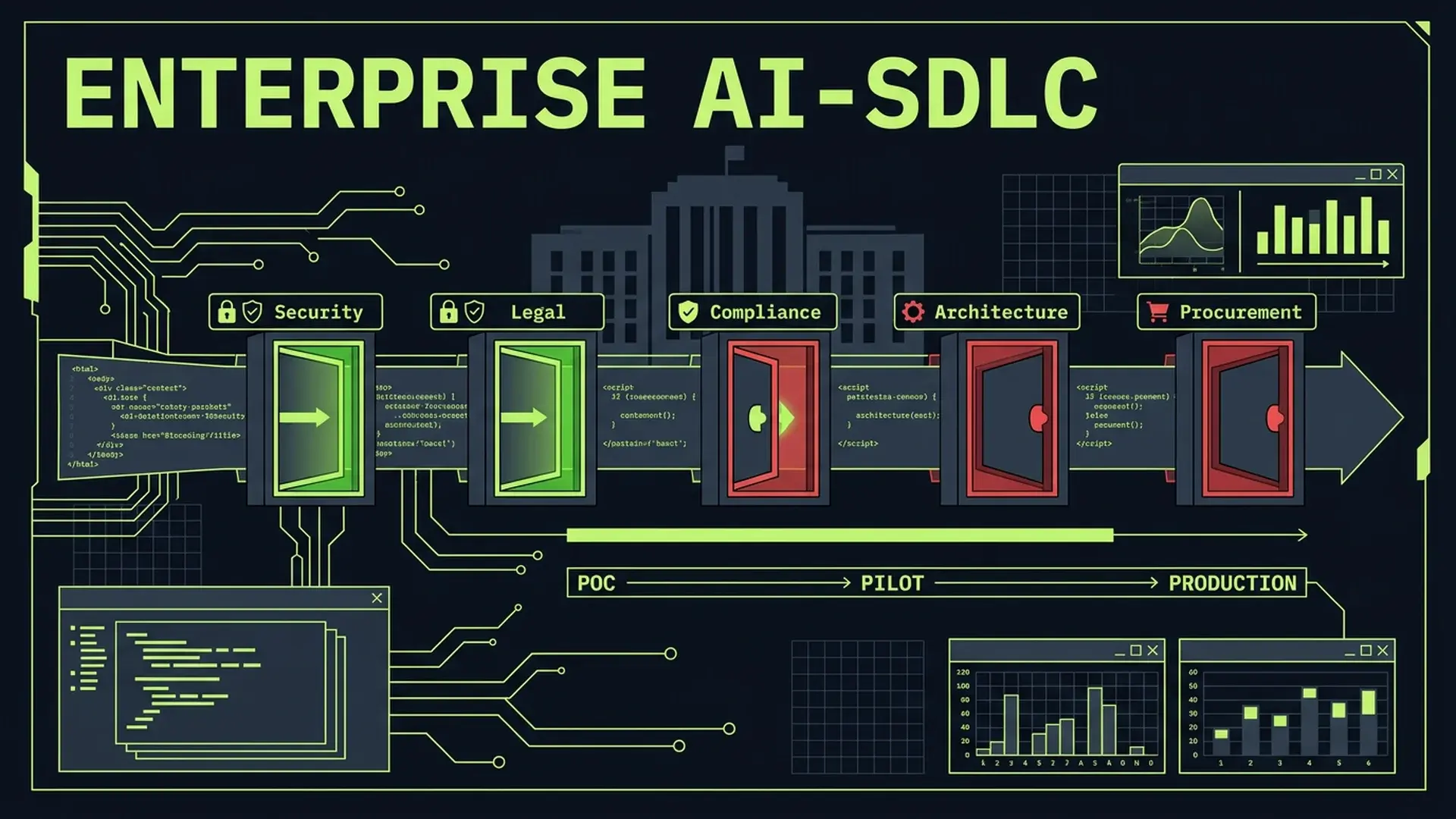
30%+ of enterprise AI projects die after POC... not because the technology fails, but because there's no integration plan for the existing SDLC. 46% of developers distrust AI accuracy, and only 3.1% report high trust in AI output. 89% of CTOs have reported production issues from AI-generated code. PR review time has increased 91% as output volume rises without corresponding quality processes. The path from "we let people use Copilot" to a coherent AI development practice requires 5 evaluation gates, 3 integration phases, and a trust architecture that doesn't depend on individual judgment.
Part of the AI-Assisted Development Guide ... from code generation to production LLMs.
The POC-to-Production Gap
Every enterprise CTO has the same story. A team runs an AI pilot. Developers love it. Productivity metrics look promising. Leadership greenlights expansion. And then... nothing. The pilot sits in limbo. Other teams can't adopt it because there's no governance framework. Security hasn't approved it. Legal hasn't reviewed the terms. Compliance doesn't know how to audit AI-assisted code.
30%+ of enterprise AI projects get abandoned after POC. The common narrative blames technology immaturity. That's wrong. The POC worked fine. What failed was the organizational integration.
I've conducted post-mortems on 9 enterprise AI pilot programs that stalled. The failure pattern is consistent:
-
No scalable integration plan. The pilot team used AI ad hoc... no standards for when, how, or where AI fits in the development lifecycle. Scaling that to 200 engineers requires process design, not just license purchases.
-
No SDLC fit. AI-generated code entered the codebase through the same review process as human code. But AI code has different failure modes, and the review process wasn't adapted. Code that "looked correct" to reviewers who didn't understand the generation process shipped bugs that humans wouldn't have written.
-
Governance gaps. Nobody defined what data could be sent to AI providers, what IP implications existed, or how to audit which code was AI-generated vs human-written. Legal and compliance were brought in after the fact... and they froze the project while they figured out the implications.
The fix isn't more technology. It's organizational engineering.
The 5 Evaluation Gates
Before any AI development tool enters your SDLC, it must pass through five organizational gates. Skip one, and you'll hit a wall when you try to scale.
| Gate | Key Questions | Responsible Party | Typical Timeline |
|---|---|---|---|
| 1. Security | What code/metadata/context leaves the boundary? Where are prompts stored? Is the connection encrypted? Can we audit data flows? | CISO / Security Engineering | 2-4 weeks |
| 2. Legal | Who owns AI-generated code? What's the IP exposure? What's the indemnification clause? Is there acceptable use policy coverage? | General Counsel / IP Attorney | 3-6 weeks |
| 3. Compliance | Are prompts, outputs, and approvals auditable? Does this meet SOC 2 / ISO 27001 / HIPAA requirements? Can we prove provenance? | Compliance Officer | 2-4 weeks |
| 4. Architecture | Where does this fit in the SDLC? What changes to CI/CD? How does it interact with existing code review? What's the rollback plan? | VP Engineering / Principal Engineer | 2-3 weeks |
| 5. Procurement | Enterprise-grade contract? SLA commitments? Data processing agreement? Exit clause and data portability? | Procurement / Vendor Management | 4-8 weeks |
Gate 1: Security
The first question isn't "is it safe?" It's "what leaves the boundary?"
Every AI coding tool sends context to a model... either a cloud API or a self-hosted instance. What context exactly? Most tools send the current file, open tabs, project structure, and sometimes git history. That's a significant data exfiltration surface.
# Security evaluation checklist
data_flow_audit:
  outbound:
    - current_file_contents: "always sent"
    - open_tab_contents: "sent for context in most tools"
    - project_structure: "file tree sent for navigation features"
    - git_history: "some tools index recent commits"
    - environment_variables: "risk if .env files are open"
    - terminal_output: "sent in agentic tools like Claude Code"
  storage:
    - prompt_logs: "check vendor retention policy"
    - generated_code: "check if vendor trains on output"
    - conversation_history: "check session vs persistent storage"
  controls:
    - data_residency: "US/EU/self-hosted options?"
    - encryption_in_transit: "TLS 1.3 minimum"
    - encryption_at_rest: "for stored prompts/outputs"
    - access_controls: "SSO, RBAC, audit logs"
    - opt_out_of_training: "contractual guarantee, not just setting"
At 10K+ employees, the surface area multiplies. A single developer sending proprietary source code to an API endpoint without a data processing agreement is a compliance incident. Multiply that by hundreds of engineers, and the risk profile is substantial.
Large enterprises are responding in two ways. First, negotiating enterprise agreements with explicit data handling terms... GitHub Copilot Enterprise, Anthropic's enterprise tier with zero-retention guarantees, and similar offerings. Second, deploying self-hosted models where nothing leaves the VPC... companies like Block (with their open-source goose tool), Meta, and Google are building internal AI coding assistants that run entirely on internal infrastructure.
Gate 2: Legal
IP ownership is the question that stalls most enterprise AI adoptions. The legal landscape in 2026 is clearer than 2024 but still requires careful navigation.
Key questions your legal team needs to answer:
- Output ownership: Does the vendor claim any rights to AI-generated code? Most enterprise agreements explicitly assign IP to the customer, but check the specific terms.
- Training data liability: If the AI generates code that's substantially similar to GPL-licensed code in its training data, who's liable? Most vendors provide indemnification... but read the caps and exclusions.
- Acceptable use: What restrictions does the vendor place on how the tool is used? Some agreements prohibit using AI output in certain regulated domains without human review.
- Termination and portability: If you switch vendors, what happens to the AI-augmented code your team wrote? Can you continue using it? Is there any dependency lock-in?
Don't let legal ambiguity become a permanent blocker. Set a 6-week decision deadline with explicit criteria. "We approve with these guardrails" is better than "we're still reviewing" 9 months later.
Gate 3: Compliance
For SOC 2, ISO 27001, or HIPAA-regulated organizations, the audit trail question is non-negotiable: can you prove which code was AI-generated, who reviewed it, and what the review criteria were?
Most companies can't. Their git history doesn't distinguish between human-written and AI-generated commits. Their code review process doesn't include AI-specific checkpoints. Their audit logs don't capture prompt-response pairs.
// PR template with AI disclosure (add to .github/PULL_REQUEST_TEMPLATE.md)
const prTemplate = `
## AI Assistance Disclosure

- [ ] This PR contains AI-generated code
- [ ] AI-generated sections have been marked with \`// AI-GENERATED\` comments
- [ ] All AI-generated code has been reviewed for:
  - [ ] Correctness (unit tests added)
  - [ ] Security (no hardcoded secrets, injection vectors, or auth bypasses)
  - [ ] Performance (no N+1 queries, unbounded loops, or memory leaks)
  - [ ] Architecture fit (follows existing patterns, no unnecessary dependencies)
- [ ] AI tool used: [Copilot / Claude Code / Cursor / Other]
- [ ] Prompts saved to: [link to prompt log, if applicable]

## Reviewer Checklist
- [ ] Verified AI disclosure is accurate
- [ ] Reviewed AI-generated sections with extra scrutiny
- [ ] Confirmed no proprietary data was sent to external AI services
`;
This isn't bureaucracy for its own sake. When your auditor asks "how do you ensure AI-generated code meets your quality standards?" you need a documented answer with evidence. Less than 30% of AI initiative leaders report executive satisfaction with ROI... and a major reason is that nobody can prove the ROI because nobody tracked the inputs.
Gate 4: Architecture
Where does AI fit in your SDLC? This is the question that separates "we bought licenses" from "we have a coherent AI development practice."
The wrong answer: AI is a free-for-all. Developers use it whenever they want, however they want, with no standards for when it's appropriate or how the output enters the codebase.
The right answer: AI assistance is mapped to specific SDLC phases with defined inputs, outputs, and quality gates.
| SDLC Phase | AI Role | Quality Gate | Human Responsibility |
|---|---|---|---|
| Requirements | Generating user stories, edge case identification | Product owner validates completeness | Prioritization, stakeholder alignment |
| Design | Architecture options, trade-off analysis | Principal engineer reviews | Final architectural decision |
| Implementation | Code generation, boilerplate, test scaffolding | Automated CI + human code review | Business logic, security-critical paths |
| Testing | Test case generation, mutation testing, edge cases | Coverage thresholds enforced in CI | Integration tests, E2E scenarios |
| Code Review | Style enforcement, common bug detection | Human reviewer signs off | Architectural fit, business logic validation |
| Deployment | Release notes, runbook generation | Ops team validates | Deployment decision, rollback criteria |
Gate 5: Procurement
Enterprise AI tool procurement isn't like buying SaaS. The contract terms matter more because you're sending proprietary source code to the vendor.
Non-negotiable contract terms:
- Zero-retention clause: Vendor doesn't store prompts or outputs beyond the session
- No-training clause: Vendor doesn't use your code to train models
- Data processing agreement (DPA): Explicit terms for data handling, compatible with your existing regulatory requirements
- Uptime SLA: If your developers depend on this tool, a 4-hour outage is an engineering department productivity incident
- Exit clause: What happens when you want to switch? Is there data portability? Lock-in?
At large enterprises (10K+ employees), Copilot dominates due to Microsoft bundling. But dominance doesn't mean fit. Evaluate whether the bundled solution actually serves your security posture, compliance requirements, and developer workflow... or whether it just reduces procurement friction.
The AI-SDLC Integration Model
Once the evaluation gates are cleared, integration happens in three phases. Rushing from phase 1 to phase 3 is how 30% of projects die.
Phase 1: Controlled Pilot (Weeks 1-8)
Select 2-3 teams. Define the scope explicitly. Measure outcomes quantitatively.
# Phase 1 configuration
pilot_scope:
  teams:
    - name: "Payments Team"
      size: 6
      rationale: "High test coverage, well-defined codebase, low regulatory risk"
    - name: "Internal Tools Team"
      size: 4
      rationale: "Low blast radius, rapid iteration, willing volunteers"
  allowed_tools:
    - "GitHub Copilot" # code completion
    - "Claude Code" # agentic coding
  restrictions:
    - "No AI for security-critical code paths (auth, encryption, payment processing)"
    - "No AI for database migration scripts"
    - "No sending customer data or PII in prompts"
  metrics:
    - "PR cycle time (baseline vs pilot)"
    - "Bug rate per KLOC (baseline vs pilot)"
    - "Developer satisfaction (weekly survey, 1-10 scale)"
    - "Code review feedback density (comments per PR)"
    - "Incident rate in pilot team codebases"
  duration: "8 weeks"
  success_criteria:
    - "PR cycle time reduction >= 15%"
    - "Bug rate does not increase by more than 10%"
    - "Developer satisfaction >= 7/10"
    - "Zero security incidents attributed to AI-generated code"
The pilot isn't about proving AI works. It works. Everyone knows that. The pilot is about discovering what breaks... what review processes need to change, what training gaps exist, and what governance is missing.
In practice with enterprise teams, the most common Phase 1 discovery is that PR review time increases, not decreases. PR review time went up 91% across the industry because AI tools increase code output without increasing review capacity. If you don't address this in Phase 1, you'll create a review bottleneck that nullifies the productivity gains.
Phase 2: Governed Expansion (Weeks 9-20)
Take the lessons from Phase 1 and build governance scaffolding before expanding. This is where most enterprises skip steps... and pay for it later.
Quality gates to implement before expanding:
- AI-specific code review checklist (the PR template above, enforced via CI)
- Training program (not "here's a tutorial"... structured curriculum with evaluation)
- Review standards (higher scrutiny for AI-generated code, especially in unfamiliar domains)
- Automated guardrails (CI checks for AI code patterns, security scanning, architecture enforcement)
// Example: automated AI-debt scanner (add to CI pipeline)
// Flags patterns common in AI-generated code that indicate quality risk

interface AiDebtPattern {
	pattern: RegExp;
	severity: "warning" | "error";
	message: string;
}

const AI_DEBT_PATTERNS: AiDebtPattern[] = [
	{
		pattern: /\/\/ TODO:?\s*(implement|add|fix|handle)/i,
		severity: "warning",
		message: "AI-generated TODO found. Resolve before merging.",
	},
	{
		pattern: /catch\s*\(\s*(?:e|err|error)\s*\)\s*\{\s*\}/,
		severity: "error",
		message: "Empty catch block. AI often generates swallowed exceptions.",
	},
	{
		pattern: /as\s+any/,
		severity: "error",
		message: "TypeScript 'as any' cast. AI frequently bypasses type safety.",
	},
	{
		pattern: /console\.(log|debug|info)\(/,
		severity: "warning",
		message: "Console statement in production code. Common AI artifact.",
	},
	{
		pattern: /\/\/ @ts-ignore/,
		severity: "error",
		message: "TypeScript suppression. AI uses these to avoid type errors.",
	},
	{
		pattern: /eslint-disable(?!-next-line)/,
		severity: "error",
		message: "Broad ESLint disable. AI generates these to suppress warnings.",
	},
];

function scanForAiDebt(fileContent: string, filePath: string): AiDebtResult[] {
	const results: AiDebtResult[] = [];

	for (const { pattern, severity, message } of AI_DEBT_PATTERNS) {
		const matches = fileContent.matchAll(new RegExp(pattern, "gm"));
		for (const match of matches) {
			const lineNumber = fileContent.substring(0, match.index).split("\n").length;
			results.push({ filePath, lineNumber, severity, message });
		}
	}

	return results;
}
Training that actually works:
Training is the #1 barrier to enterprise AI adoption. Not technology. Not budget. Skills gap. Here's what tends to work:
| Training Component | Duration | Format | Outcome |
|---|---|---|---|
| AI Tool Proficiency | 4 hours | Hands-on workshop | Can use tools effectively |
| Prompt Engineering for Code | 4 hours | Hands-on workshop | Can write effective prompts |
| AI Code Review | 8 hours | Paired review sessions | Can identify AI-specific failure modes |
| Architecture with AI | 4 hours | Case study discussion | Knows when AI fits and when it doesn't |
| Security and Compliance | 2 hours | Lecture + Q&A | Understands data handling requirements |
Total investment: ~22 hours per engineer. At $100/hour loaded cost for a senior engineer, that's $2,200 per person. For a 50-person engineering org, $110K... less than one AI Engineer hire and applicable across the entire team.
Phase 3: Mature Practice (Weeks 21+)
At this stage, AI assistance is embedded in the SDLC with automated checks, continuous monitoring, and organization-wide standards.
Characteristics of a mature AI development practice:
- AI usage telemetry. You know how much AI-generated code enters your codebase, which teams use it most, and what the quality outcomes are per team.
- Automated quality enforcement. CI pipelines include AI-specific checks... the debt scanner above, plus coverage requirements, security scanning, and architecture conformance tests.
- Continuous training. Quarterly skill assessments, monthly tool updates, peer learning sessions. AI tooling changes fast... your training can't be a one-time event.
- Feedback loops. Incident post-mortems track whether AI-generated code was a contributing factor. Code review metrics distinguish AI-generated from human-written PRs. This data feeds back into governance policy.
The Trust Architecture
Only 3.1% of developers highly trust AI output. 46% actively distrust it. This isn't a technology problem... it's a process problem. Trust comes from systematic validation, not from better models.
Risk-Based Review Requirements
Not all code carries the same risk. Your review process should scale with consequence.
| Risk Level | Code Category | AI Involvement | Review Requirement |
|---|---|---|---|
| Critical | Auth, payments, encryption, PII handling | AI-assisted drafting only, human writes final | 2 senior reviewers, security team sign-off |
| High | Core business logic, data processing, API contracts | AI generates, human reviews thoroughly | 1 senior reviewer + automated security scan |
| Medium | Feature code, UI components, internal tools | AI generates with standard review | 1 reviewer + CI quality gates |
| Low | Tests, documentation, config, boilerplate | AI generates with light review | 1 reviewer, primarily automated checks |
The key insight: 89% of CTOs reported production issues from AI-generated code. The majority of those issues were in the "medium" category... feature code that passed standard review but contained subtle logic errors. Raising the review bar for medium-risk AI code eliminates most production incidents.
Automated Validation Gates
Human review alone can't scale. You need automated gates that catch the patterns AI-generated code is most likely to get wrong.
# .github/workflows/ai-quality-gates.yml
ai_quality_gates:
  security:
    - gitleaks: "scan for hardcoded secrets"
    - semgrep: "OWASP Top 10 patterns"
    - dependency_audit: "known vulnerable packages"
  quality:
    - ai_debt_scanner: "patterns common in AI-generated code"
    - type_coverage: "no 'as any' in TypeScript, minimum 95% typed"
    - test_coverage: "minimum 80% line coverage for new code"
    - complexity: "cyclomatic complexity < 15 per function"
  architecture:
    - import_boundaries: "no unauthorized cross-module imports"
    - api_contract: "no breaking changes without version bump"
    - naming_conventions: "enforce consistent naming patterns"
  performance:
    - bundle_size: "no PR increases bundle by more than 5KB ungzipped"
    - query_analysis: "no N+1 patterns in ORM queries"
Audit Trail Requirements
For regulated industries, the audit trail must answer three questions at any point in time:
- What code was AI-generated? Git commit metadata, PR labels, or inline annotations.
- Who reviewed it? PR approval records with explicit sign-off.
- What were the review criteria? Documented checklist completion, not just "LGTM."
This is where less than 30% executive satisfaction with AI ROI intersects with governance. If you can't prove what AI contributed and how it was validated, you can't measure ROI... and you can't satisfy auditors.
Vendor Selection at Enterprise Scale
The enterprise AI coding tool market has consolidated around three tiers. Choosing between them depends on your security posture, compliance requirements, and developer workflow.
| Criterion | GitHub Copilot Enterprise | Claude Code (Anthropic) | Cursor Business |
|---|---|---|---|
| Deployment | Cloud (Microsoft Azure) | Cloud or BYOK | Cloud (custom infra) |
| Data retention | Optional zero-retention | Zero-retention enterprise | Configurable retention |
| SSO/SCIM | Yes (Azure AD native) | Yes (SAML/OIDC) | Yes (SAML) |
| Audit logs | Yes (Azure-integrated) | Yes (API-accessible) | Limited |
| Self-hosted option | No | API with VPC deployment | No |
| IDE support | VS Code, JetBrains, Neovim | Terminal-native, IDE extensions | Cursor IDE (VS Code fork) |
| Agentic capabilities | Copilot Workspace | Full agentic coding | Agentic via Composer |
| Enterprise contract | Standard Microsoft EA | Custom enterprise agreement | Custom agreement |
| Bundling | M365/Azure discounts | Standalone | Standalone |
At 10K+ employees, Copilot dominates because of Microsoft bundling. Companies already paying for M365 E5 or GitHub Enterprise get Copilot at marginal cost. This makes the procurement gate trivially easy... but it doesn't mean Copilot is the right tool for every team.
Companies building internal custom agents at scale... Block with goose, Meta with internal tools, Google with internal infrastructure... are choosing the self-hosted path. They've concluded that the security and customization benefits of running models on internal infrastructure outweigh the operational cost.
For most enterprises between 500 and 10K employees, the decision comes down to: do you want the tool that's easiest to procure (Copilot), the tool with the strongest agentic capabilities (Claude Code), or the tool with the best editor integration (Cursor)?
The honest answer: it doesn't matter as much as you think. The governance framework... the 5 gates, the 3 phases, the trust architecture... is tool-agnostic. Get the process right first. Tool selection is a procurement decision, not an engineering one.
When NOT to Formalize AI-SDLC Integration
Governance overhead has a cost. Here's when the overhead exceeds the benefit:
Teams under 20 engineers. The governance framework described above requires dedicated effort to implement and maintain. For small teams, the cost of process exceeds the risk of ad hoc AI usage. A simple policy... "use AI tools, review critically, don't send secrets"... is sufficient until you're large enough that ad hoc breaks down.
Regulated environments where AI is prohibited. Some defense, intelligence, and financial services contracts explicitly prohibit AI-generated code. If your contract says no, don't build a governance framework to work around it. Wait for the regulatory clarity.
When the pilot showed no measurable benefit. If your Phase 1 pilot showed no improvement in cycle time, no reduction in bug rate, and developers rated satisfaction below 5/10, don't scale. Investigate why before proceeding. Common causes: wrong tool for the codebase, insufficient training, or developers who are already expert enough that AI adds more overhead than value (the METR paradox... experienced developers sometimes slow down with AI).
When the overhead would consume the gains. If implementing the 5-gate evaluation takes 6 months and costs $200K in staff time for a 30-person engineering team, the ROI is negative for at least a year. Scale the governance to the organization. A 30-person team doesn't need the same framework as a 3,000-person team.
FAQ
How long does it take to implement the full AI-SDLC framework?
Plan for 5-6 months from initial evaluation to mature practice. The 5 evaluation gates take 6-10 weeks (running in parallel where possible). Phase 1 pilot is 8 weeks. Phase 2 governed expansion is 12 weeks. Phase 3 maturity is ongoing. In practice, the most common mistake is trying to compress this into 8 weeks... which skips the governance steps that prevent the 30%+ project failure rate.
What's the ROI measurement framework for enterprise AI coding tools?
Track four metrics: developer throughput (PRs merged per sprint), code quality (bugs per KLOC, incident rate), review efficiency (review time per PR), and developer satisfaction (monthly survey). Compare against a 3-month pre-AI baseline. Important: measure at the team level, not the individual level. Individual AI usage patterns vary too much for reliable measurement. Team-level data smooths out the variance and captures the systemic effects... including review overhead.
Should we build our own AI coding assistant or use a vendor?
Use a vendor unless you have 500+ engineers, a dedicated ML platform team, and a security posture that prohibits sending any code to external APIs. Building a competitive AI coding assistant requires model fine-tuning, inference infrastructure, IDE integration, and continuous improvement... a 15-20 person team minimum. For companies building their own: Block's goose is open-source and provides a useful starting point for custom agent development.
How do we handle developers who refuse to use AI tools?
Don't force adoption. In practice, forced adoption breeds resentment and shadow workarounds (developers using personal accounts to avoid enterprise monitoring). Instead, make AI tools available, provide training, and let results speak. Track team-level metrics and share them transparently. Teams that adopt effectively will outperform teams that don't... and the laggards will adopt when they see the data, not when they're told to.
What's the biggest enterprise AI adoption mistake you've seen?
Skipping the training investment. Companies buy licenses for 500 engineers, send a "here's your login" email, and expect productivity gains. 6 months later, utilization is 30%, the engineers who do use it haven't learned to review AI output critically, and there's a backlog of AI-generated bugs in production. The $110K training investment for a 50-person team (22 hours per engineer at loaded cost) is the highest-ROI spend in the entire AI adoption budget. Skip it, and you're buying a tool nobody knows how to use safely.
[CTA] I help enterprises integrate AI into their SDLC without the governance gaps that kill 30% of projects after POC.
Continue Reading
This post is part of the AI-Assisted Development Guide ... covering code generation, LLM architecture, prompt engineering, and cost optimization.
More in This Series
- AI-Assisted Development Guide ... The comprehensive framework
- AI Code Review ... Catching what LLMs miss
- SOC 2 Compliance for Startups ... The 90-day roadmap
- Cognitive Debt ... The hidden cost your AI-assisted team isn't measuring
Need an AI-SDLC integration plan for your organization? Work with me on your enterprise AI governance strategy.